Device Mode
Through the use of a USB A-to-A cable, the Quadstick can switch to a second Host, like a PC or game console. The enable_usb_a_device preference on a Preferences sheet controls which port is active:
|
Preferences
|
|
|
|
|
|
Preference
|
Value
|
|
enable_usb_a_device
|
1
|
Sample configuration spreadsheet: USB A
• Do not set the value of the enable_usb_a_device to 1 in the prefs.csv or default.csv files. You may lose the ability to connect to your Quadstick. Only use the feature in other configuration files that are selected after power up.
• Power for the Quadstick only comes through the USB-B port, so it must remain connected to a power source while using the USB-A port in device mode.
• CronusMax Full Crossover, with a USB hub, will not operate with USB connections that ever change after they first connect. This means you cannot disconnect from a Full Crossover connection on USB B to a separate host on the USB A then back again. The CronusMax in Partial Crossover mode does not have this limitation and you can switch back and forth at will.
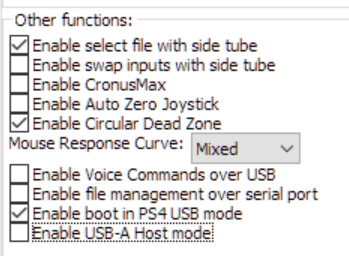
The Enable USB-A Host mode preference setting must be disabled in the
QMP->Misc tab
prior to using USB-A Device mode: